Unreal Engine: Mathematics for Games

Last week I covered actors, components, and blueprints, and this week was a slight divergence away from Unreal Engine itself.
If, like me, your relationship with vectors ended at school maths lessons, this week was a rude awakening in the best possible way. Nearly every gameplay behaviour - knowing whether an enemy is behind you, where a grenade lands, how high a jump goes - reduces to a handful of operations on vectors.
This week’s notes cover vectors, dot and cross products, and the kinematic equations of motion.
What is a Vector?
A Vector is defined as a quantity having direction as well as magnitude, especially as determining the position of one point in space relative to another. In Unreal Engine, this direction is measured from the origin, and the magnitude represents the length.
This Actor in the world is located at the coordinates given in the details panel and the Unit Vectors that represent the axes of the world.
The numbers beside the colour-coded representation of the axes represent the distance along that axis that has been travelled from the origin.
The Length of this Vector is the total distance travelled from the origin and is calculated by:
Length =√(a2 + b2 + c2)
This is important to know because oftentimes we will base behaviours on distance between two objects in world space; in Unreal we can just call the size() function.
Vector Addition and Subtraction
Vector addition allows for controlled placement of objects relative to others. A common example is positioning an object in front of the player by adding their ForwardVector to their current location. This technique is useful for placing UI elements, projectiles, or AI-controlled actors.
Vector subtraction can be used to determine the direction and distance between two objects. This is essential for movement calculations and targeting systems.
In Unreal Engine, you can subtract two locations to get a directional vector and visualise it using DrawDebugDirectionalArrow().
Dot Product
Dot Product returns a scalar value, meaning that the operation between two vectors returns a number, not a vector. This number tells us how aligned the two vectors are.
a • b = |a| × |b| × cos(θ)
It’s important to use unit vectors when performing the dot product.
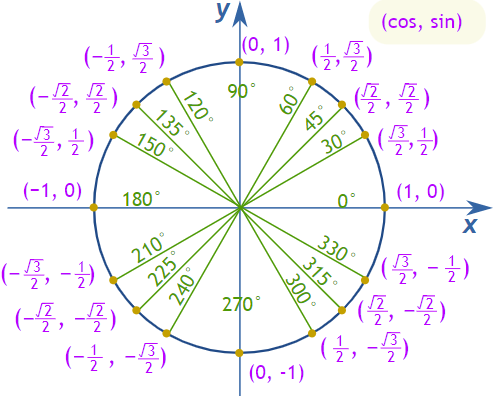
It’s important to use unit vectors when performing the dot product.
If we are to take the dot product between x and y:
- cos value is 1 → they are parallel (aligned in the same direction)
- cos value is 0 → they are perpendicular
- Negative value → vectors are facing opposite directions
This allows us to do checks to see if an enemy/object is behind our facing direction, and it also lets us check which object is best aligned with our facing direction.
Dot product checks are invaluable in surveying the world.
Cross Product
Cross product is a vector operation that returns a vector. The vector returned is perpendicular to the two vectors. This is very useful in determining an orthogonal vector, which gives us a normal vector on a plane. The cross product can also be used to find the angle between two vectors. Below is the cross product formula (magnitude only).
A × B = |A| |B| sin(θ)
(Note: this formula gives the magnitude. The direction follows the right-hand rule.)
Kinematic Equations
In games, objects move constantly – whether it’s a player sprinting, a grenade being thrown, or an enemy falling off a ledge. To simulate motion accurately, we use kinematic equations, which describe movement in terms of displacement, velocity, acceleration, and time. These equations allow us to predict where an object will be at any point in time, how fast it will move, and how long it will take to reach a destination.
Below are four essential kinematic equations used in game development.
Equation 1
v = u + at
v: Final velocityu: Initial velocitya: Accelerationt: Time
When to use: This equation helps determine an object’s final velocity when it starts with a known speed and accelerates (or decelerates) over time.
Example: A character starts sprinting from rest (u = 0) and accelerates at 2 m/s² for 3 seconds. What is their final speed?
In Unreal, this can be applied to dynamically adjusting a character’s velocity when they press the run button.
Equation 2
s = ( ( u+v ) / 2 ) ⋅ t
s: Displacementu: Initial velocityv: Final velocityt: Time
When to use: Useful when an object’s initial and final velocities are known and needing to determine how far it has travelled over a period of time.
Example: A rolling boulder in a game starts at 5m/s and slows to 1m/s over 4 seconds. How far did it roll?
Equation 3
s = ut + ½at²
s: Displacementu: Initial velocitya: Accelerationt: Time
When to use: Use this equation when you know an object’s initial speed and acceleration but want to find how far it will travel in a given time.
Example: A character jumps upward with an initial velocity of 10 m/s. How high will they go in 1 second, assuming gravity is -9.8 m/s²?
This is frequently used in jump mechanics in games like platformers.
Equation 4
Relates final velocity, initial velocity, acceleration, and displacement.
v² = u² + 2as
v: Final velocityu: Initial velocitya: Accelerations: Displacement
When to use: Use this equation when finding an object’s velocity at a specific position, without needing to factor in time.
Example: A cannon shoots a projectile straight up with an initial speed of 20 m/s. What is its speed when it reaches 10 m high?
This is useful in games where projectiles, jumps, or falling objects need to be predicted.
This was the week that finally answered a question I’ve had since starting: why is the engine written the way it is?
Things I’d taken as arbitrary - the Size() function, DrawDebugDirectionalArrow, the structure of movement components — all slot into place once you know what’s underneath them.