Automated Unreal Engine Build Server on AWS Part 2: Unreal AMI
This post continues from Part 1, where I created a base AMI with build tools installed. Now I’ll cover two critical pieces:
- A Lambda function that automatically retrieves GitHub runner tokens (solving the token expiry problem)
- An AMI with a specific Unreal Engine version installed, ready for GitHub Actions builds
The complete code repository is available at: sawnoff-studios/unreal-build-server-image
Contents
This post covers the Lambda used for retrieving self-hosted runner tokens from GitHub, as well as using the base AMI to install a specific version of Unreal Engine for building projects
- Architecture Overview – Architecture of the overall solution
- Runner Token Lambda – Lambda that retrieves the self-hosted runner token from GitHub
- GitHub App Setup – allowing the Lambda to retrieve runner tokens
- The Unreal Engine Binary Workaround – Unreal Engine binaries used to build projects
- AWS Resources for UE-Specific AMIs – AWS resources used to build the AMI
- Deployment Workflow – deploying the image pipeline using GitHub Actions
As before, a repository with the full code for this solution can be found here:
sawnoff-studios/unreal-build-server-image
Architecture Overview
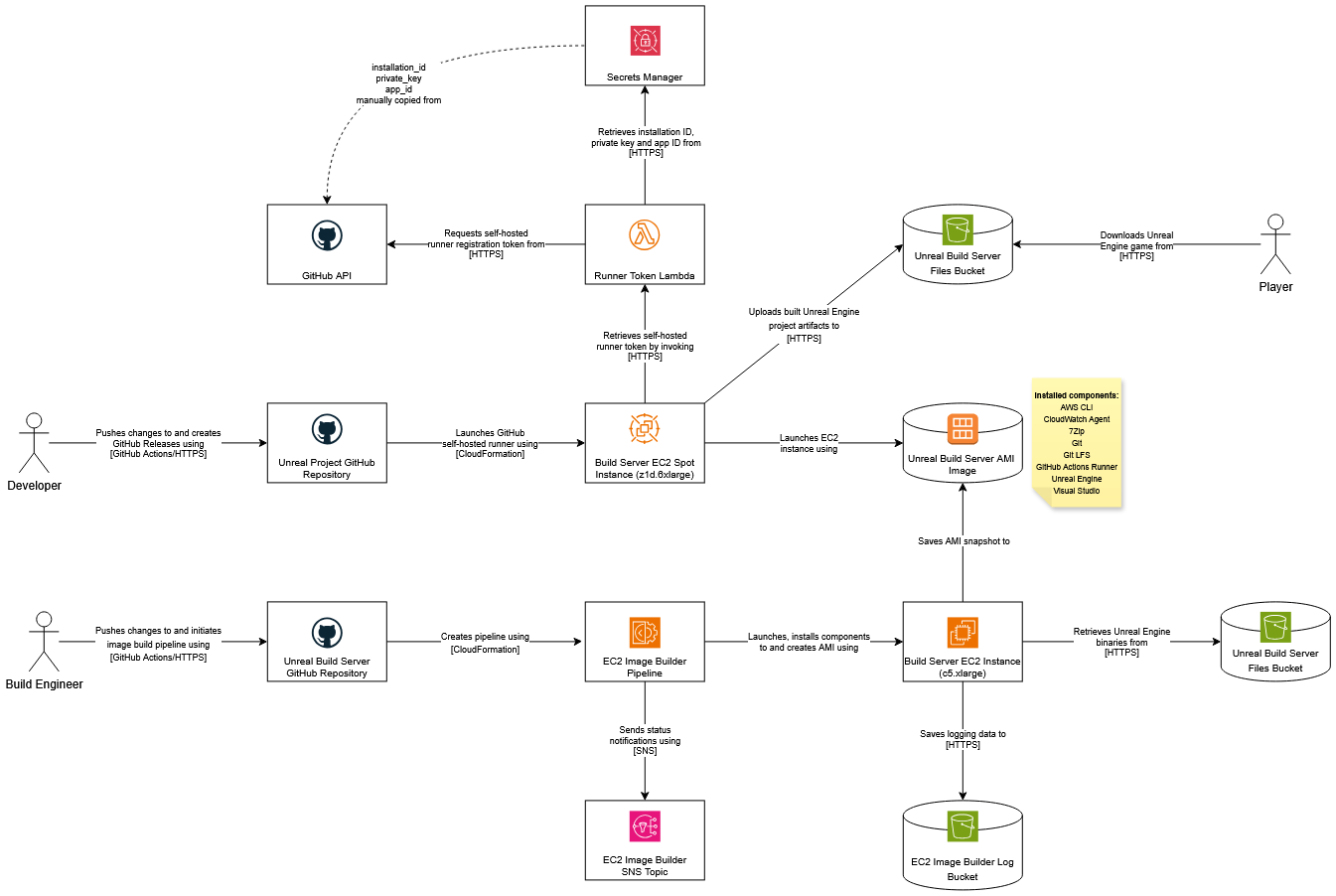
The solution uses EC2 Spot Instances that invoke a Lambda on startup to fetch fresh GitHub tokens, register themselves as runners, and execute builds – all without human intervention.
Runner Token Lambda
In Part 1, I discovered that manually created AMIs fail after a day or two because GitHub runner tokens expire. Self-hosted runners require periodic token renewal, and static AMIs have no mechanism to handle this.
The solution: a Lambda function that the EC2 instance calls during startup to get a fresh registration token.
The Lambda retrieves credentials from Secrets Manager, exchanges them for a GitHub App JWT, then forges an installation token, and finally requests a runner registration token from GitHub’s API.
const { SecretsManagerClient, GetSecretValueCommand } = require("@aws-sdk/client-secrets-manager");
const jwt = require("jsonwebtoken");

const secretsManager = new SecretsManagerClient({});
const GITHUB_API = "https://api.github.com";

async function getSecret(secretName) {
    const command = new GetSecretValueCommand({ SecretId: secretName });
    const response = await secretsManager.send(command);
    return JSON.parse(response.SecretString);
}

function createGitHubAppJWT(appId, privateKey) {
    const now = Math.floor(Date.now() / 1000);
    return jwt.sign(
        { iat: now - 60, exp: now + (10 * 60), iss: appId },
        privateKey,
        { algorithm: "RS256" }
    );
}

async function getInstallationToken(appJWT, installationId) {
    const response = await fetch(`${GITHUB_API}/app/installations/${installationId}/access_tokens`, {
        method: "POST",
        headers: { "Authorization": `Bearer ${appJWT}`, "Accept": "application/vnd.github+json" }
    });

    if (!response.ok) {
        throw new Error(`Failed to get installation token: ${response.status}`);
    }

    const body = await response.json();
    return body.token;
}

async function createRunnerRegistrationToken(installationToken, organization) {
    const response = await fetch(`${GITHUB_API}/orgs/${organization}/actions/runners/registration-token`, {
        method: "POST",
        headers: { "Authorization": `Bearer ${installationToken}`, "Accept": "application/vnd.github+json" }
    });

    if (!response.ok) {
        throw new Error(`Failed to create runner token: ${response.status}`);
    }

    const body = await response.json();
    return body.token;
}

exports.handler = async () => {
    const secret = await getSecret(process.env.SECRETS_MANAGER_KEY_NAME);
    const appJWT = createGitHubAppJWT(secret.app_id, atob(secret.private_key));
    const installationToken = await getInstallationToken(appJWT, secret.installation_id);
    const runnerToken = await createRunnerRegistrationToken(installationToken, process.env.GITHUB_ORGANISATION);

    return { statusCode: 200, body: JSON.stringify({ token: runnerToken }) };
};
Key insight: The token flows through three stages – GitHub App credentials → Installation token → Runner registration token—each with its own expiry window.
GitHub App Setup
For the Lambda to access GitHub, I created a GitHub App with these values:
| Setting | Value |
|---|---|
| App name | Your choice (e.g., “Unreal Build Runner”) |
| Homepage URL | Any valid URL (can be your organisation page) |
| Expire user authorization tokens | Unchecked |
| Webhook active | Unchecked |
| Organization permissions → Self-hosted runners | Read and write |
Why Read and Write? The orgs/{org}/actions/runners/registration-token endpoint uses HTTP POST, requiring write access.
Storing Credentials securely
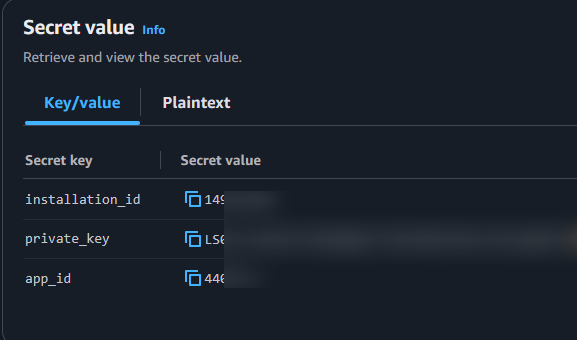
Three values from the GitHub App must be stored as GitHub Secrets:
| Secret | Location in GitHub App UI |
|---|---|
LAMBDA_APP_ID | Settings → General → App ID |
LAMBDA_APP_INSTALLATION_ID | Settings → Permissions → Installation ID |
LAMBDA_APP_PRIVATE_KEY | Settings → Credentials → Generate a private key |
The following values are then stored in the GitHub repository as secrets for the GitHub Actions workflow that deploys the CloudFormation template:
- LAMBDA_APP_ID – App ID value that’s listed under the ‘General’ tab for the GitHub App.
- LAMBDA_APP_INSTALLATION_ID – Installation ID value that’s listed under the ‘Permissions’ tab for the GitHub App.
- LAMBDA_APP_PRIVATE_KEY – Private key value that’s listed under the ‘Credentials’ → ‘Key pairs’ tab for the GitHub App.
These are then passed to Secrets Manager via the deployment workflow:
Lambda Deployment with SAM
The SAM template stores GitHub credentials in Secrets Manager and deploys the Lambda:
AWSTemplateFormatVersion: '2010-09-09'
Transform: AWS::Serverless-2016-10-31
Description: Deploys a Lambda function that creates GitHub Actions runner registration tokens using a GitHub App.

Parameters:
  GitHubOrganisation:
    Type: String
    Description: GitHub organisation name

  SecretsManagerKeyName:
    Type: String
    Description: Secrets Manager key containing GitHub App credentials

  GitHubAppId:
    Type: String
    Description: GitHub App ID

  GitHubAppInstallationId:
    Type: String
    Description: GitHub App installation ID

  GitHubAppPrivateKey:
    Type: String
    Description: GitHub App private key

Resources:
  GitHubRunnerAppSecret:
    Type: AWS::SecretsManager::Secret
    Properties:
      Name: !Ref SecretsManagerKeyName

      Description:
        GitHub App credentials for Actions runner registration

      SecretString: !Sub
        |
        {
          "app_id": "${GitHubAppId}",
          "installation_id": "${GitHubAppInstallationId}",
          "private_key": "${GitHubAppPrivateKey}"
        }

  GitHubRunnerTokenLambda:
    Type: AWS::Serverless::Function
    Properties:
      FunctionName: github-runner-token
      Description: Creates GitHub Actions runner registration tokens using a GitHub App
      Runtime: nodejs24.x
      Handler: index.handler
      Timeout: 30
      MemorySize: 128
      CodeUri: runner-token/
      Environment:
        Variables:
          SECRETS_MANAGER_KEY_NAME: !Ref SecretsManagerKeyName
          GITHUB_ORGANISATION: !Ref GitHubOrganisation
      Policies:
        - AWSLambdaBasicExecutionRole
        - Version: '2012-10-17'
          Statement:
            - Effect: Allow
              Action: secretsmanager:GetSecretValue
              Resource: !Ref GitHubRunnerAppSecret


Outputs:
  RunnerTokenLambdaArn:
    Description: Lambda ARN
    Value: !GetAtt GitHubRunnerTokenLambda.Arn
Note: The runtime is nodejs24.x (as of October 2026). The AWSLambdaBasicExecutionRole policy handles CloudWatch logging, so no additional IAM policies are required.
GitHub Actions Workflow
name: Deploy Runner Token Lambda

on:
  workflow_dispatch:
  push:
    branches:
      - main
    paths:
      - ".github/workflows/deploy-runner-token-lambda.yml"
      - "runner-token-lambda-infra.yml"
      - "runner-token/**"

env:
  PROJECT_NAME: "UnrealBuildServerRunnerTokenLambda"
  AWS_REGION: "ap-southeast-2"
  LAMBDA_ZIP_FILE_PATH: "./lambda.zip"
  LAMBDA_S3_BUCKET_NAME: "unreal-build-server-files"
  GITHUB_ORGANISATION: "sawnoff-studios"
  SECRETS_MANAGER_KEY_NAME: "/github/actions/runner-key"

permissions:
  id-token: write
  contents: read

jobs:
  DeployStack:
    runs-on: ubuntu-latest

    steps:
      - name: Clone repository
        uses: actions/checkout@v7

      - name: Install AWS SAM
        uses: aws-actions/setup-sam@v3
        with:
          use-installer: true
          token: ${{ secrets.GITHUB_TOKEN }}

      - name: SAM validate
        run: sam validate --template-file ${{ github.workspace }}/runner-token-lambda-infra.yml

      - name: NPM install
        run: npm install --prefix ${{ github.workspace }}/runner-token

      - name: SAM build
        run: sam build -t ${{ github.workspace }}/runner-token-lambda-infra.yml

      - name: Configure AWS credentials
        uses: aws-actions/configure-aws-credentials@v4
        with:
          role-to-assume: ${{ secrets.IAM_ROLE }}
          role-session-name: ${{ env.PROJECT_NAME }}
          aws-region: ${{ env.AWS_REGION }}

      - name: SAM deploy
        run: |
          sam deploy --template-file ${{ github.workspace }}/runner-token-lambda-infra.yml \
            --stack-name ${{ env.PROJECT_NAME }}Stack \
            --s3-bucket ${{ env.LAMBDA_S3_BUCKET_NAME }} \
            --s3-prefix runner-token-lambda \
            --force-upload \
            --capabilities CAPABILITY_IAM \
            --no-confirm-changeset \
            --no-fail-on-empty-changeset \
            --parameter-overrides \
              'ParameterKey=GitHubOrganisation,ParameterValue=${{ env.GITHUB_ORGANISATION }}' \
              'ParameterKey=SecretsManagerKeyName,ParameterValue=${{ env.SECRETS_MANAGER_KEY_NAME }}' \
              'ParameterKey=GitHubAppId,ParameterValue=${{ secrets.LAMBDA_APP_ID }}' \
              'ParameterKey=GitHubAppInstallationId,ParameterValue=${{ secrets.LAMBDA_APP_INSTALLATION_ID }}' \
              'ParameterKey=GitHubAppPrivateKey,ParameterValue=${{ secrets.LAMBDA_APP_PRIVATE_KEY }}'
The Unreal Engine Binary Workaround
This is the crux of the problem: installing Unreal Engine on a headless EC2 instance requires logging into the Epic Games Launcher, which demands two-factor authentication – a dead end for automation.
I explored several options:
| Approach | Verdict | Reason |
|---|---|---|
| Epic Games Launcher CLI | ❌ | No support for automated 2FA |
| Compile from source | ❌ | Requires Epic GitHub org access; prohibitively expensive |
| Offline installer subscription | ❌ | Costs money; not justified for hobbyist use |
| Local copy to S3 | ✅ | Already had binaries locally; no additional cost |
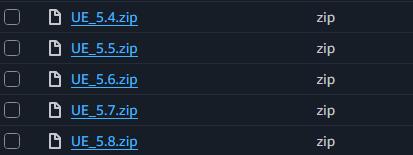
The winner: compressing existing UE_x.x folders from my local machine and uploading to S3. From there, the EC2 instance downloads and extracts during image builds.
Important caveat: This approach assumes you already own a licensed copy of Unreal Engine and have it installed locally. Distributing proprietary binaries from Epic Games may violate their Terms of Service – this workaround was for personal use only.
AWS Resources for UE-Specific AMIs
AWS resources for a specific version are mostly the same as the base image – the main difference is parameters passed to the template.
Parameters:
  ResourceName:
    Type: String
    Default: WindowsServer2025-Unreal-Engine
    Description: A name to use for all Image Builder resources

  InstanceType:
    Type: String
    Description: EC2 instance type used during image build

  FilesBucketName:
    Type: String
    Description: Name of the S3 bucket for Unreal Engine files

  UnrealMajorVersion:
    Type: String
    Description: Unreal Engine major version

  UnrealMinorVersion:
    Type: String
    Description: Unreal Engine minor version

  SnsTopicArn:
    Type: String
Description: SNS topic ARN for notificationsResourceName- base name used for substituting other values in the templateInstanceType- EC2 instance type used during image buildFilesBucketName- name of the S3 bucket that contains the zipped Unreal Engine binariesUnrealMajorVersion- Unreal Engine major versionUnrealMinorVersion- Unreal Engine minor versionSnsTopicArn- SNS topic ARN for notifications
EC2 instance role
EC2 instance role is the same as the base image.
  InstanceRole:
    Type: AWS::IAM::Role
    Metadata:
      Comment: Role to be used by instance during image build.
    Properties:
      RoleName: !Sub ${ResourceName}-${UnrealMajorVersion}.${UnrealMinorVersion}-InstanceRole
      ManagedPolicyArns:
        - Fn::Sub: arn:${AWS::Partition}:iam::aws:policy/AmazonSSMManagedInstanceCore
        - Fn::Sub: arn:${AWS::Partition}:iam::aws:policy/EC2InstanceProfileForImageBuilder
      AssumeRolePolicyDocument:
        Version: "2012-10-17"
        Statement:
          - Action:
              - sts:AssumeRole
            Effect: Allow
            Principal:
              Service:
                - !Sub 'ec2.${AWS::URLSuffix}'
      Path: /executionServiceEC2Role/
Instance role logging policy
Instance role logging policy is also the same as the base image.
  InstanceRoleLoggingPolicy:
    Type: AWS::IAM::Policy
    Metadata:
      Comment: Allows the instance to save log files to an S3 bucket.
    Properties:
      PolicyName: !Sub ${ResourceName}-${UnrealMajorVersion}.${UnrealMinorVersion}-InstanceRoleLoggingPolicy
      Roles:
        - Ref: InstanceRole
      PolicyDocument:
        Version: 2012-10-17
        Statement:
          - Action:
              - s3:PutObject
            Effect: Allow
            Resource:
              - Fn::Join:
                  - ''
                  - - 'arn:'
                    - !Sub ${AWS::Partition}
                    - ':s3:::'
                    - !ImportValue ImageBuilderLogBucketName
                    - '/*'
The main difference is PolicyName is derived from the ResourceName, UnrealMajorVersion and UnrealMinorVersion parameters passed to the template.
Instance files bucket policy
Grants read-only access to the specific S3 bucket containing UE archives – a principle of least privilege.
  InstanceFilesBucketPolicy:
    Type: AWS::IAM::Policy
    Metadata:
      Comment: Allows the instance to download files from an S3 bucket.
    Properties:
      PolicyName: !Sub ${ResourceName}-${UnrealMajorVersion}.${UnrealMinorVersion}-InstanceFilesBucketPolicy
      Roles:
        - Ref: InstanceRole
      PolicyDocument:
        Version: 2012-10-17
        Statement:
          - Action:
              - s3:GetObject
            Effect: Allow
            Resource:
              - Fn::Sub: arn:${AWS::Partition}:s3:::${FilesBucketName}/*
Instance profile
The instance profile passes the instance role.
  InstanceProfile:
    Type: AWS::IAM::InstanceProfile
    Properties:
      InstanceProfileName: !Sub ${ResourceName}-${UnrealMajorVersion}.${UnrealMinorVersion}-InstanceProfile
      Roles:
        - Ref: InstanceRole
Infrastructure configuration
Save for the Name property, the infrastructure configuration is almost identical to the base image.
  InfrastructureConfiguration:
    Type: AWS::ImageBuilder::InfrastructureConfiguration
    Properties:
      Name: !Sub ${ResourceName}-${UnrealMajorVersion}-${UnrealMinorVersion}-BuildInfrastructure
      InstanceTypes:
        - !Ref InstanceType
      InstanceProfileName:
        Ref: InstanceProfile
      SnsTopicArn: !Ref SnsTopicArn
      Logging:
        S3Logs:
          S3BucketName: !ImportValue ImageBuilderLogBucketName
Unreal Engine component
Unreal Engine binaries are first downloaded to C:\Windows\Temp and then extracted to C:\Program Files\Epic Games using 7-zip.
  UnrealEngineComponent:
    Type: AWS::ImageBuilder::Component
    Properties:
      Name: !Sub Install-Unreal-Engine-${UnrealMajorVersion}-${UnrealMinorVersion}
      Description: !Sub Installs Unreal Engine ${UnrealMajorVersion}.${UnrealMinorVersion}
      Platform: Windows
      Version: 1.0.0
      ChangeDescription: Initial Unreal Engine component

      Data: !Sub |
        name: Install Unreal Engine
        description: Downloads and extracts Unreal Engine
        schemaVersion: 1.0

        phases:
          - name: build
            steps:
              - name: DownloadUnrealEngine
                action: ExecutePowerShell
                inputs:
                  commands:
                    - |
                      $ErrorActionPreference = "Stop"
                      $ZipFilePath = "C:\Windows\Temp\UnrealEngine.zip"

                      Write-Host "Downloading Unreal Engine binaries..."
                      Read-S3Object -BucketName unreal-build-server-files -Key UE_${UnrealMajorVersion}.${UnrealMinorVersion}.zip -File $ZipFilePath

                      if (!(Test-Path $ZipFilePath)) {
                        throw "Unreal Engine download failed"
                      }

              - name: ExtractUnrealEngine
                action: ExecutePowerShell
                inputs:
                  commands:
                    - |
                      $ErrorActionPreference = "Stop"
                      $7ZipExePath = "C:\Program Files\7-Zip\7z.exe"
                      $ZipFilePath = "C:\Windows\Temp\UnrealEngine.zip"

                      Write-Host "Extracting Unreal Engine binaries..."
                      & $7ZipExePath x -o"C:\Program Files\Epic Games\" $ZipFilePath -y
                      Remove-Item -Path $ZipFilePath -Force

              - name: SetFolderPermissions
                action: ExecutePowerShell
                inputs:
                  commands:
                    - |
                      icacls "C:\Program Files\Epic Games\UE_${UnrealMajorVersion}.${UnrealMinorVersion}" /grant "NT AUTHORITY\NETWORK SERVICE:(OI)(CI)M" /T /C /Q

              - name: VerifyUnrealEngine
                action: ExecutePowerShell
                inputs:
                  commands:
                    - |
                      $ErrorActionPreference = "Stop"
                      $UnrealPath = "C:\Program Files\Epic Games\UE_${UnrealMajorVersion}.${UnrealMinorVersion}\"

                      Write-Host "Verifying Unreal Engine extraction..."

                      if (!(Test-Path $UnrealPath)) {
                          throw "Unreal Engine directory not found at $UnrealPath"
                      }

                      $RunUatBatch = Join-Path $UnrealPath "\Engine\Build\BatchFiles\RunUAT.bat"

                      if (!(Test-Path $RunUatBatch)) {
                          throw "RunUAT.bat not found - extraction may have failed"
                      }

                      Write-Host "Unreal Engine verified successfully at $UnrealPath"
Critical detail: The icacls command sets permissions on the extracted files so the NETWORK SERVICE account (used by GitHub Runner) can access them:
| Switch | Purpose |
|---|---|
(OI) | Object Inherit – apply to files |
(CI) | Container Inherit – apply to subfolders |
M | Modify rights (read/write/execute/delete) |
/T | Traverse entire directory tree |
/C | Continue on errors |
/Q | Quiet mode (suppress success output) |
Without this step, the GitHub Runner service would fail with “Access Denied” when trying to execute build scripts.
Why 7-Zip instead of PowerShell’s Expand-Archive? The UE archives contain 200,000–250,000 files across 50,000+ folders and 7-Zip’s multi-threaded extraction is significantly faster.
Image recipe
The image recipe is identical to the base image, save for the Name property.
  ImageRecipe:
    Type: AWS::ImageBuilder::ImageRecipe
    Properties:
      Name: !Sub ${ResourceName}-${UnrealMajorVersion}-${UnrealMinorVersion}
      Version: 1.0.0
      ParentImage: !ImportValue UnrealBuildServerBaseImage
      BlockDeviceMappings:
        - DeviceName: /dev/sda1
          Ebs:
            VolumeSize: 250
            VolumeType: gp3
      Components:
        - ComponentArn: !Ref UnrealEngineComponent
AMI distribution configuration
The distribution configuration uses the ResourceName, UnrealMajorVersion and UnrealMinorVersion parameters extensively.
  DistributionConfiguration:
    Type: AWS::ImageBuilder::DistributionConfiguration
    Properties:
      Name: !Sub ${ResourceName}-${UnrealMajorVersion}-${UnrealMinorVersion}
      Distributions:
        - Region:
            Ref: AWS::Region
          AmiDistributionConfiguration:
            Name: !Sub ${ResourceName}-${UnrealMajorVersion}-${UnrealMinorVersion}-{{imagebuilder:buildDate}}
            Description: !Sub Windows Server 2025 with Unreal Engine ${UnrealMajorVersion}.${UnrealMinorVersion} installed
            AmiTags:
              UnrealEngineVersion: !Sub "${UnrealMajorVersion}.${UnrealMinorVersion}"
Note the tag: UnrealEngineVersion allows GitHub Actions workflows to filter AMIs by engine version dynamically.
Image pipeline
Finally, the image pipeline ties everything together in the same way the base template does.
  ImagePipeline:
    Type: AWS::ImageBuilder::ImagePipeline
    Properties:
      Name: !Sub ${ResourceName}-${UnrealMajorVersion}-${UnrealMinorVersion}-Pipeline
      ImageRecipeArn:
        Ref: ImageRecipe
      InfrastructureConfigurationArn:
        Ref: InfrastructureConfiguration
      DistributionConfigurationArn:
        Ref: DistributionConfiguration
      Status:
        ENABLED
Outputs
This template returns the image builder pipeline ARN in the output variables.
Outputs:
  ImageBuilderPipelineArn:
    Description: Image Builder Pipeline ARN
    Value:
      Ref: ImagePipeline
Deployment Workflow
The next part is deploying the Unreal Engine image pipeline using GitHub Actions. Again, this is split into two parts: deploying the image pipeline and running the image pipeline.
Deploying the image pipeline
This workflow is very similar to the base image pipeline, except for the UNREAL_MAJOR_VERSION and UNREAL_MINOR_VERSION variables.
name: Deploy 5.6 Image Build Pipeline

on:
  workflow_dispatch:

env:
  PROJECT_NAME: "Unreal56BuildServerImage"
  AWS_REGION: "ap-southeast-2"
  INSTANCE_TYPE: "c5.xlarge"
  UNREAL_FILES_BUCKET_NAME: "unreal-build-server-files"
  UNREAL_MAJOR_VERSION: "5"
  UNREAL_MINOR_VERSION: "6"

permissions:
  id-token: write
  contents: read

jobs:
  DeployStack:
    runs-on: ubuntu-latest

    steps:
      - name: Clone repository
        uses: actions/checkout@v7

      - name: Configure AWS credentials
        uses: aws-actions/configure-aws-credentials@v6
        with:
          role-to-assume: ${{ secrets.IAM_ROLE }}
          role-session-name: ${{ env.PROJECT_NAME }}
          aws-region: ${{ env.AWS_REGION }}

      - name: Remove existing CloudFormation stack
        run: |
          aws cloudformation delete-stack --stack-name ${{ env.PROJECT_NAME }}Stack
          aws cloudformation wait stack-delete-complete --stack-name ${{ env.PROJECT_NAME }}Stack

      - name: Deploy CloudFormation stack
        uses: aws-actions/aws-cloudformation-github-deploy@v2
        id: deploy
        with:
          name: ${{ env.PROJECT_NAME }}Stack
          template: ${{ github.workspace }}/image-pipeline-infra.yml
          parameter-overrides:
            "InstanceType=${{ env.INSTANCE_TYPE }},\
            FilesBucketName=${{ env.UNREAL_FILES_BUCKET_NAME }},\
            UnrealMajorVersion=${{ env.UNREAL_MAJOR_VERSION }},\
            UnrealMinorVersion=${{ env.UNREAL_MINOR_VERSION }},\
            SnsTopicArn=${{ secrets.SNS_TOPIC_ARN }}"
          capabilities: 'CAPABILITY_NAMED_IAM'
Running the image pipeline
Identical to Part 1 - retrieve the pipeline ARN from CloudFormation outputs and start execution:
name: Run 5.6 Image Build Pipeline

on:
  workflow_dispatch:

env:
  PROJECT_NAME: "RunUnreal56BuildServerImagePipeline"
  AWS_REGION: "ap-southeast-2"
  BUILD_IMAGE_STACK_NAME: "Unreal56BuildServerImageStack"

permissions:
  id-token: write
  contents: read

jobs:
  RunImagePipeline:
    runs-on: ubuntu-latest

    steps:
      - name: Clone repository
        uses: actions/checkout@v7

      - name: Configure AWS credentials
        uses: aws-actions/configure-aws-credentials@v6
        with:
          role-to-assume: ${{ secrets.IAM_ROLE }}
          role-session-name: ${{ env.PROJECT_NAME }}
          aws-region: ${{ env.AWS_REGION }}

      - name: Get pipeline ARN
        id: get-pipeline-arn
        run: |
          IMAGE_STACK_PIPELINE_ARN=$(aws cloudformation describe-stacks \
            --stack-name ${{ env.BUILD_IMAGE_STACK_NAME }} \
            --query "Stacks[0].Outputs[?OutputKey=='ImageBuilderPipelineArn'].OutputValue" \
            --output text)

          echo "PIPELINE_ARN=$IMAGE_STACK_PIPELINE_ARN" >> $GITHUB_OUTPUT

      - name: Start pipeline execution
        id: start-pipeline-execution
        run: |
          aws imagebuilder start-image-pipeline-execution --image-pipeline-arn ${{ steps.get-pipeline-arn.outputs.PIPELINE_ARN }}
Build Time Reality: Creating UE-specific AMIs takes ~60 minutes on c5.xlarge – roughly twice as long as the base image. The bottleneck isn’t network download speed (11–14 GB files) but the number of individual files being extracted.
Wrapping Up
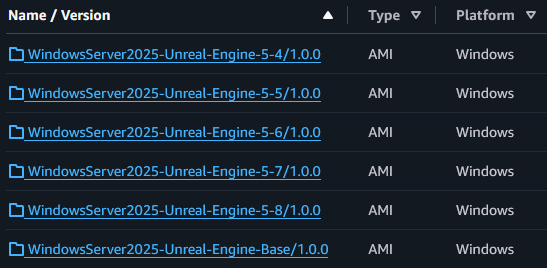
I now have tagged AMIs for different Unreal Engine versions, each ready to serve as a GitHub Actions self-hosted runner. The next challenge: wiring everything together so a Spot Instance spins up, registers itself, executes the build, and tears down - all automatically.
In Part 3, I’ll cover:
- The UserData script that orchestrates instance startup
- How the GitHub Runner registers and unregisters itself
- The complete GitHub Actions workflow that triggers Spot Instance builds
- Clean-up strategies to avoid runaway Spot Instance charges
Until then, the AMIs are sitting in EC2, waiting to be put to work.
Related Posts
2026-01-09
2026-01-07